
As the dynamics of digital communication continue to expand, the need for greater oversight and management within email systems becomes increasingly critical. One such tool that’s proving indispensable for email administration is ‘Message Trace.’ This function allows administrators to trace an email’s path and, subsequently, decode what transpired with it.
Table of Contents
Understanding Message Trace
Message Trace is essentially a tool designed to grant administrators an in-depth understanding of an email message’s journey and final fate. Often situated within email handling services settings, for instance, under Mail Flow > Message Trace in settings, it clarifies whether an email was delivered, quarantined, failed to send, or is pending delivery — essential information in the event of a critical email mishap.
Exploring the Message Trace Interface
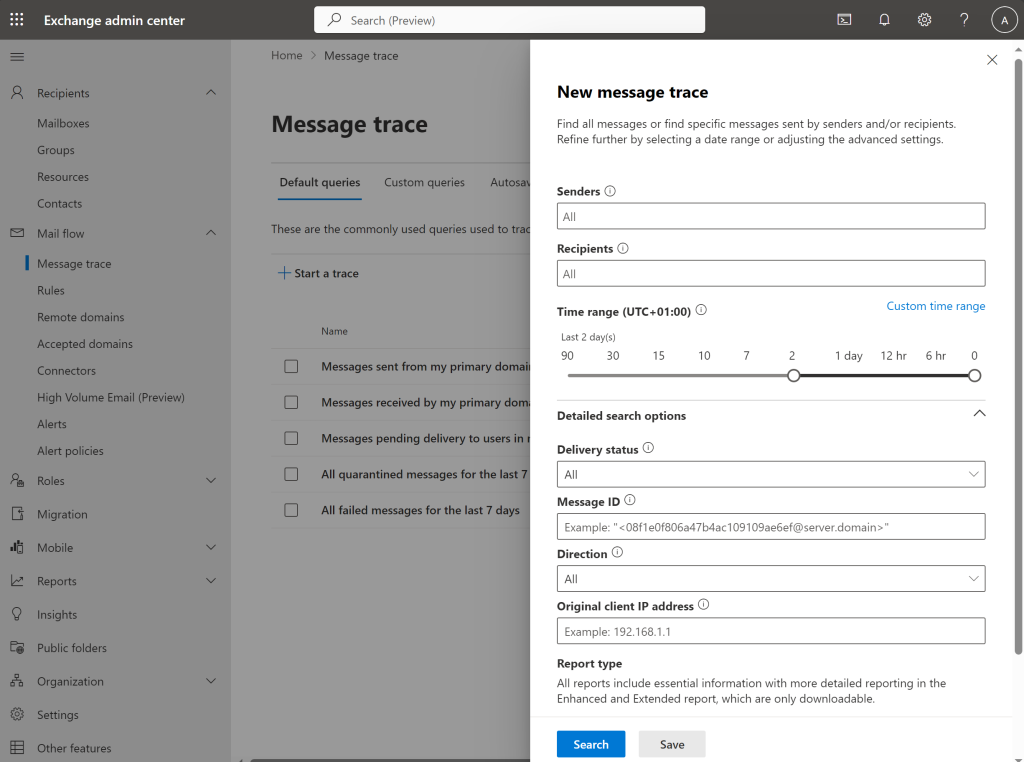
The updated Message Trace interface creates a more user-friendly experience. It provides the flexibility to leverage standard message trace settings and generate tailored queries. The ability to adjust parameters offers a personalized experience, allowing administrators to streamline searches based on individual or organizational needs.
Using Default Message Trace Queries
The interface comes preconfigured with various default queries ready for customization. These include:
- Messages sent from my primary domain in the last day
- Messages received by my primary domain in the last day
- Messages pending delivery to users in my organization
- All quarantined messages for the last seven days
- All failed messages for the last seven days
These queries provide a broad framework that encompasses most general search requirements.
Customizing Message Trace Parameters
Further, the interface enables the creation or modification of message trace parameters using date ranges, senders, recipients, delivery status, message IDs, and directionality. This customization ability ensures a more focused and controlled message trace, eliminating unnecessary noise during searches.
Using Message Trace with Exchange Online PowerShell
In tandem with the Get-MessageTrace cmdlet in Exchange Online PowerShell, users can filter searches based on starting and ending dates, sender, recipient, subject, and status. The capacity to use defined criteria enables a more precise search that can quickly identify and provide insights into specific email instances/interactions.
Examples of Using Message Trace with Exchange Online PowerShell:
To trace all messages sent between two individuals (Alice Smith and Bob Johnson) over the past week, you would use the following command:
Import-Module ExchangeOnlineManagement
Connect-ExchangeOnline
$Users = @('[email protected]','[email protected]')
Get-MessageTrace -SenderAddress $Users -RecipientAddress $Users -StartDate (Get-Date).AddDays(-7) -EndDate (Get-Date)
In case you want to trace all messages sent by a single individual, say Alice Smith, to any recipient over the past week, the respective command would be as follows:
Connect-ExchangeOnline
$Sender = '[email protected]'
Get-MessageTrace -SenderAddress $Sender -StartDate (Get-Date).AddDays(-7) -EndDate (Get-Date)
If you’re interested in tracing messages sent by multiple individuals, such as Alice Smith, Bob Johnson, and Charlie Davis, to any recipient over the past week, you would use the following command:
Connect-ExchangeOnline
$Senders = @('[email protected]','[email protected]', '[email protected]')
$Senders | ForEach-Object {Get-MessageTrace -SenderAddress $_ -StartDate (Get-Date).AddDays(-7) -EndDate (Get-Date)}
Conclusion
Message Trace proves an invaluable tool for email administration. By integrating user-friendly interfaces, customizable defaults, various parameters, and integration with Exchange Online PowerShell, Message Trace provides a comprehensive platform for email oversight. Like any useful tool, mastering it requires understanding its potentials and appropriate application; however, with some practice, it can significantly streamline administrative responsibilities and decision-making protocols in email management.